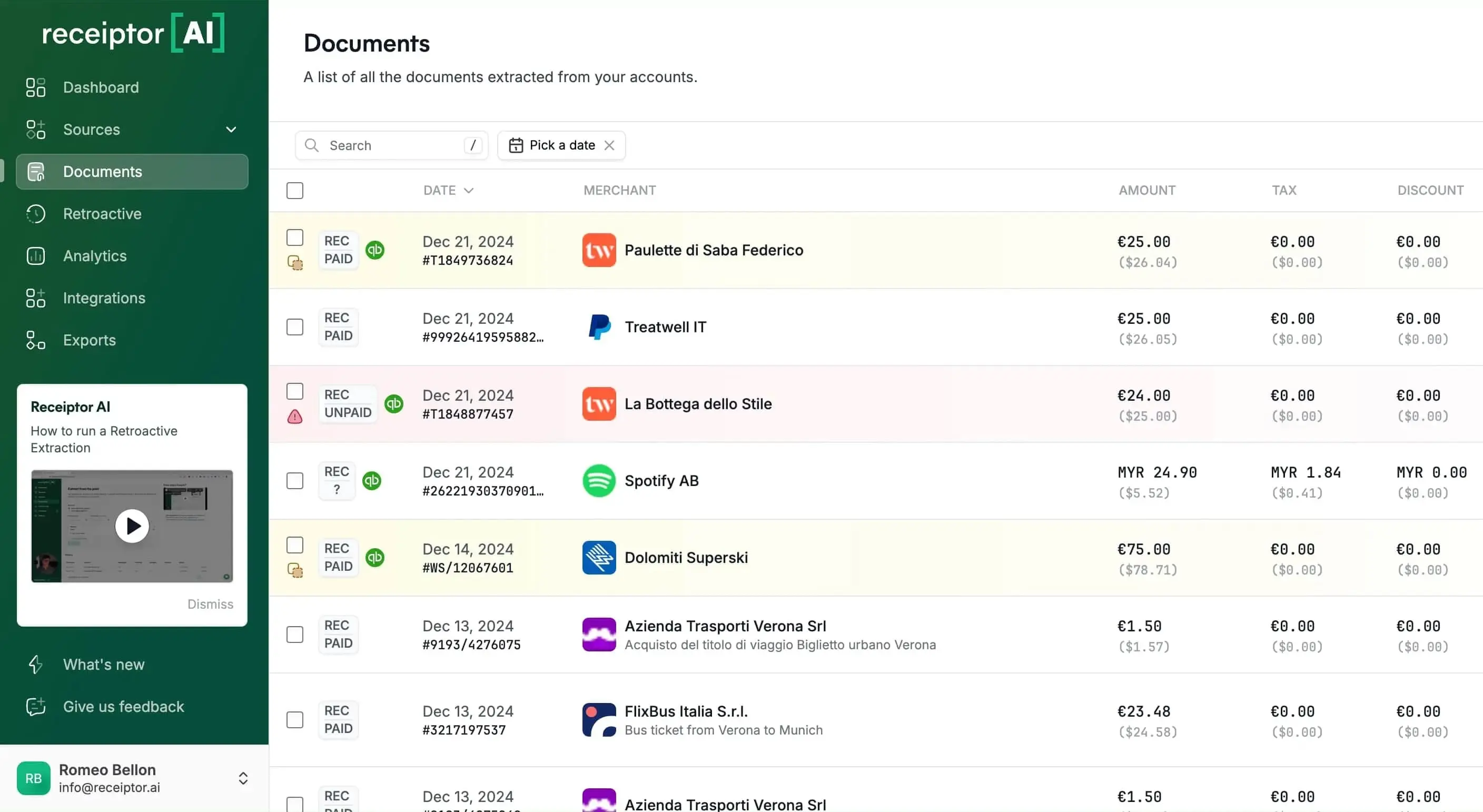
Connect your email. We find, extract, and organize documents automatically.
Any Currency/Language
Smart Categorization
Audit-Ready Reports
Retroactive Extraction
Real-time Processing
WhatsApp Support
emails/WhatsApp/uploads processed
receipts & invoices extracted
hours freed up
emails/WhatsApp/uploads processed
receipts & invoices extracted
hours freed up
emails/WhatsApp/uploads processed
receipts & invoices extracted
hours freed up

Why Teams Choose Receiptor AI
Join 7,000+ businesses saving countless hours weekly on bookkeeping. Let AI handle the tedious work while you focus on growing your business.

Extracts and categorizes every invoice and receipt, from PDF attachments to embedded email transactions (e.g., PayPal, Uber, etc.).


IMAP
Seamlessly integrates with any email account in the world, including Gmail, Outlook, Yahoo, etc.

Instantly visualize business expenses with dynamic graphs and charts, offering insights far quicker than traditional accounting methods.


Receipts and invoices are auto-categorized, with all the details filled in and a PDF attached.

Easily export documents as individual PDFs in a ZIP, as PDF reports, or in detailed CSV files.
“Wait... you read my email?”
Here's exactly what we access (and don't). Your emails stay in your inbox—we never move, delete, or modify them.
Learn more in our Privacy Policy.
Compare your options
Receiptor AI is built to deliver ROI fast by replacing repetitive bookkeeping tasks with dependable automation.
Start Free Trial| Capability | Receiptor AI | Manual Workflows | Generic OCR Tools |
|---|---|---|---|
| Receipt capture from email, uploads, and WhatsApp | Automated | Manual forwarding | Partial |
| Context-aware categorization | AI with transaction context | Spreadsheet rules | Basic OCR tags |
| Retroactive inbox extraction | Built in | Time-intensive | Usually unavailable |
| Audit-ready exports and accounting sync | CSV, PDF, ZIP, Drive, Xero, QuickBooks | Manual prep | Export only |
| Time saved per week | 5+ hours | 0 hours | 1-2 hours |
See Receiptor AI in Action
60 seconds to see 5 hours of work disappear. Watch the magic of automated bookkeeping.
Gmail, Outlook, WhatsApp, manual uploads, or forward receipts directly
Our AI automatically finds and extracts all receipts and invoices with smart categorization
QuickBooks, Xero, Google Drive, or export to CSV, PDF, ZIP formats
What customers say after switching to Receiptor AI
7,000+ businesses use Receiptor AI to save 5+ hours every week and keep bookkeeping cleaner across every close cycle.
Three types of businesses love Receiptor AI
From solopreneurs to accounting firms, Receiptor AI consistently saves 5+ hours every week.
Receiptor runs in the background while you focus on growing your business. No more scrambling at tax time—just connect your email and move on.
Capture receipts from email, uploads, and WhatsApp automatically so you can focus on billable work instead of admin.
Deliver cleaner books to clients with auto-categorized documents, better compliance, and less back-and-forth.
See your autopilot savings
Calculate how much time and money you'll save with automated bookkeeping. Most businesses save 5+ hours weekly—see your potential ROI in seconds.
15 minutes
100 invoices
1 people
$25/hour
Current monthly hours
0h
Receiptor AI processing time
< 0 minutes
(~ 30s/doc)Monthly time saved
0 hours
Gross monthly savings
$0
Receiptor AI monthly cost
-$0
Net monthly savings
$0
Net yearly savings
$0
Return on Investment
0%
Frequently asked questions
No, Receiptor AI does not save any message in our database. We only save message IDs to keep track of what message has been processed and which not.
Yes, Receiptor AI use of information received from Google APIs adheres to Google API Services User Data Policy, including the Limited Use requirements.
Yes, Receiptor AI has successfully completed a Cloud Application Security Assessment (CASA) and has been validated by the App Defense Alliance (ADA). This assessment includes a review of application conformance with CASA recognized security frameworks, verification of automated security test (AST) application scan results, and conformation to non-functional CASA requirements. This means that Receiptor AI meets the CASA TIER 2 requirements, ensuring a high level of security for our users. You can learn more about CASA and its industry-recognized security standards on the CASA developer site.Please note that the validation is valid from the issue date of 6/2/2023 until the expiration date of 6/2/2026.
Yes, Receiptor AI can identify emails containing receipts, attached receipts, or links to receipts and extract the information, saving you hours of manual searching.
Absolutely! Receiptor AI can retroactively analyze your entire email history to identify and extract receipt information.
Receiptor AI extracts crucial receipt details such as purchase amounts, categories, dispute deadlines, and more.
Yes, you can easily export reports in PDF format with Receiptor AI, simplifying your accounting and financial tracking processes.
Yes, Receiptor AI allows you to instantly generate a spreadsheet with all your necessary financial information, reducing the chances of missed deductions and saving you time on tax preparation.
Receiptor AI is designed to benefit a wide range of users, including individuals filing tax returns, small business owners, and accountants.
The time-saver you've been waiting for.
Turn hours of manual bookkeeping into minutes of automated magic. Extract receipts from emails, WhatsApp, and uploads—then watch as they're instantly categorized, organized, and ready for your accountant. Your financial records, always complete, always audit-ready.
See how it worksInstantly finds and extracts receipts from emails, attachments, and links—no manual searching needed.
Scan years of email history to recover missed receipts and invoices from any time period.
AI-powered categorization based on actual purchase context, not just keywords.
Export to CSV/PDF, sync with QuickBooks/Xero, store in Google Drive, or forward to any email.
Works with receipts in any language—perfect for international businesses.
Auto-detect subscriptions and recurring charges with monthly, quarterly, and annual cost projections.
Visualize spending trends by category over time with daily and monthly breakdowns.
Set up rules to auto-categorize, export, or forward documents based on merchant, amount, or type—no manual work needed.