Last Updated: April 2026
Accountants can now query a client's entire expense history in plain English and get instant answers: missing invoices, anomalous charges, category breakdowns, quarter-over-quarter comparisons, anything they would normally spend an afternoon hunting through spreadsheets to find. This is not a feature locked inside enterprise audit software. It works today, for small firms, using tools that take under an hour to set up.
What accountants are actually losing to manual expense review
Mid-market accounting firms lose more than 340 hours every tax season chasing client documents, before any actual accounting work begins. At 8 minutes per receipt to sort, verify, and code manually, that is a significant chunk of non-billable time and it compounds every quarter.
The time cost is only part of it. Every follow-up email asking for a missing receipt is a small withdrawal from the client relationship. Enough of them and the client stops feeling like they have an advisor and starts feeling like they have an auditor. Most of this friction is concentrated at tax season, when months of unreviewed documents arrive at once and errors surface too late to fix cleanly. It is a pattern that produces real burnout.
What changes with AI is not just speed. It is the ability to question your data and get a contextual answer. Instead of working document by document, you ask: "Which suppliers invoiced monthly last year but have no invoice in Q1?" The AI knows the full expense history and answers immediately. Less forensic digging, more direct insight.
What you can do with AI
Imagine you have an AI agent that knows every receipt, invoice, and bill your client has ever received and you can ask it anything, in plain English, and get an answer in seconds. Here is what makes that possible.
The following use cases assume a setup described later in this article: client documents collected and structured by Receiptor AI, connected to Claude or ChatGPT via MCP.
1. Cross-reference receipts against the bank statement
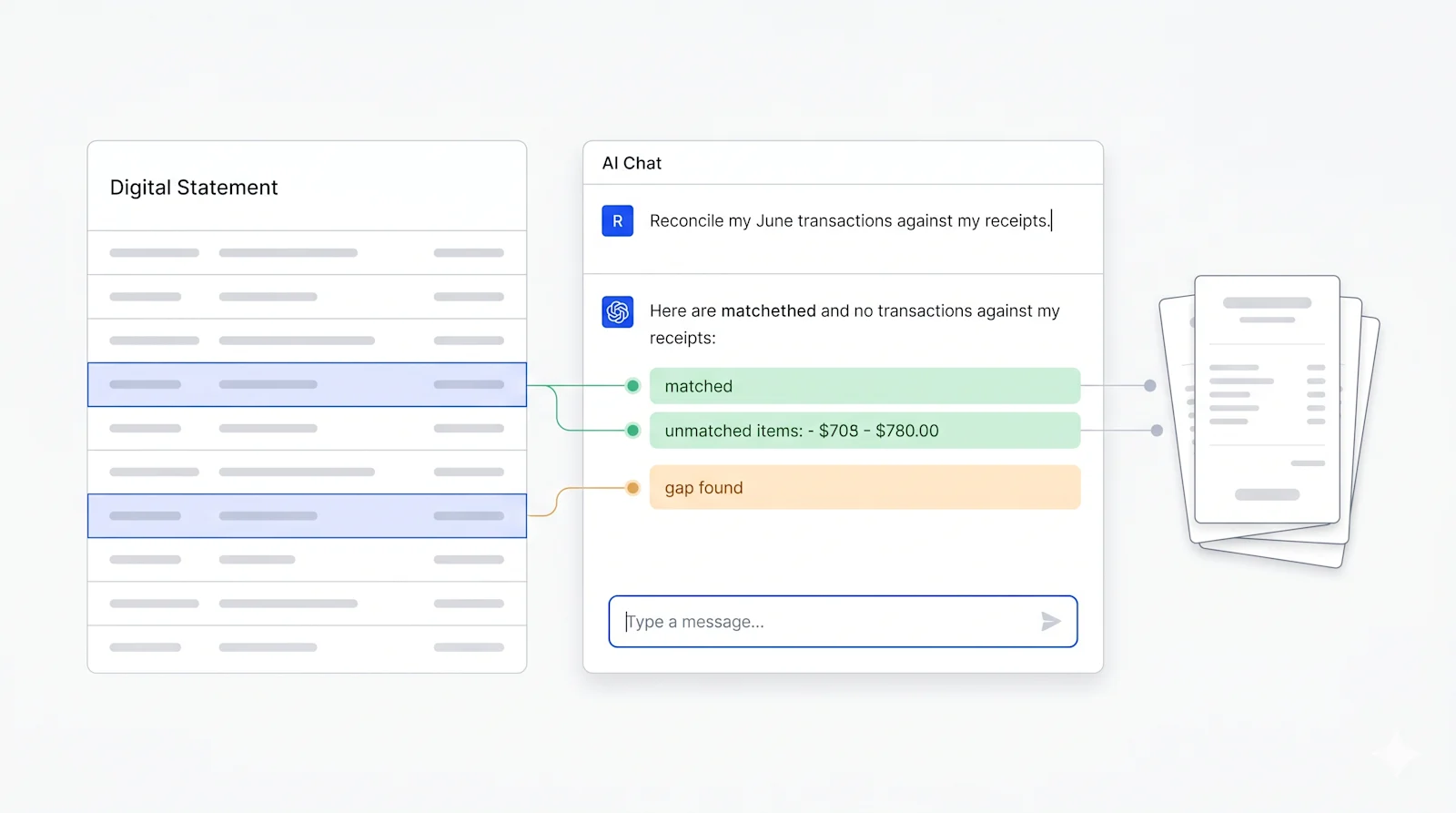
Upload the client's bank statement and ask: "Are there any transactions on this bank statement that don't have a corresponding receipt in their Receiptor workspace?" The AI compares the two sources and surfaces gaps. What used to require building a VLOOKUP in Excel now takes a prompt.
2. Find missing invoices for a period
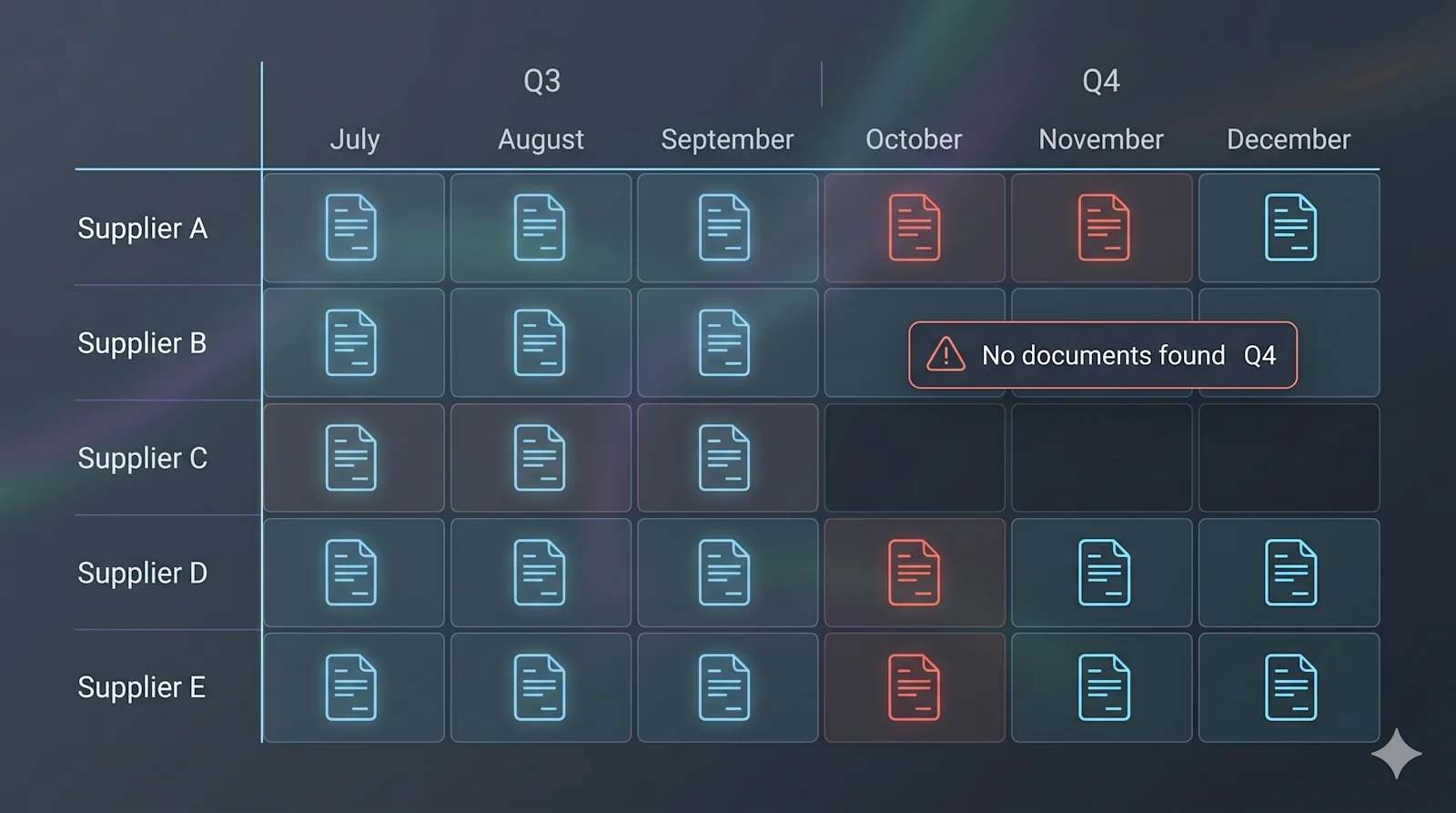
Ask: "Which suppliers invoiced this client in Q3 but have no documents in Q4?" If a supplier who reliably invoices every month goes quiet, that is a red flag: an invoice lost in a personal inbox, a payment made outside the normal workflow, or a supplier relationship the client hasn't mentioned. AI surfaces the pattern; you make the call.
3. Flag anomalies and items that need your review
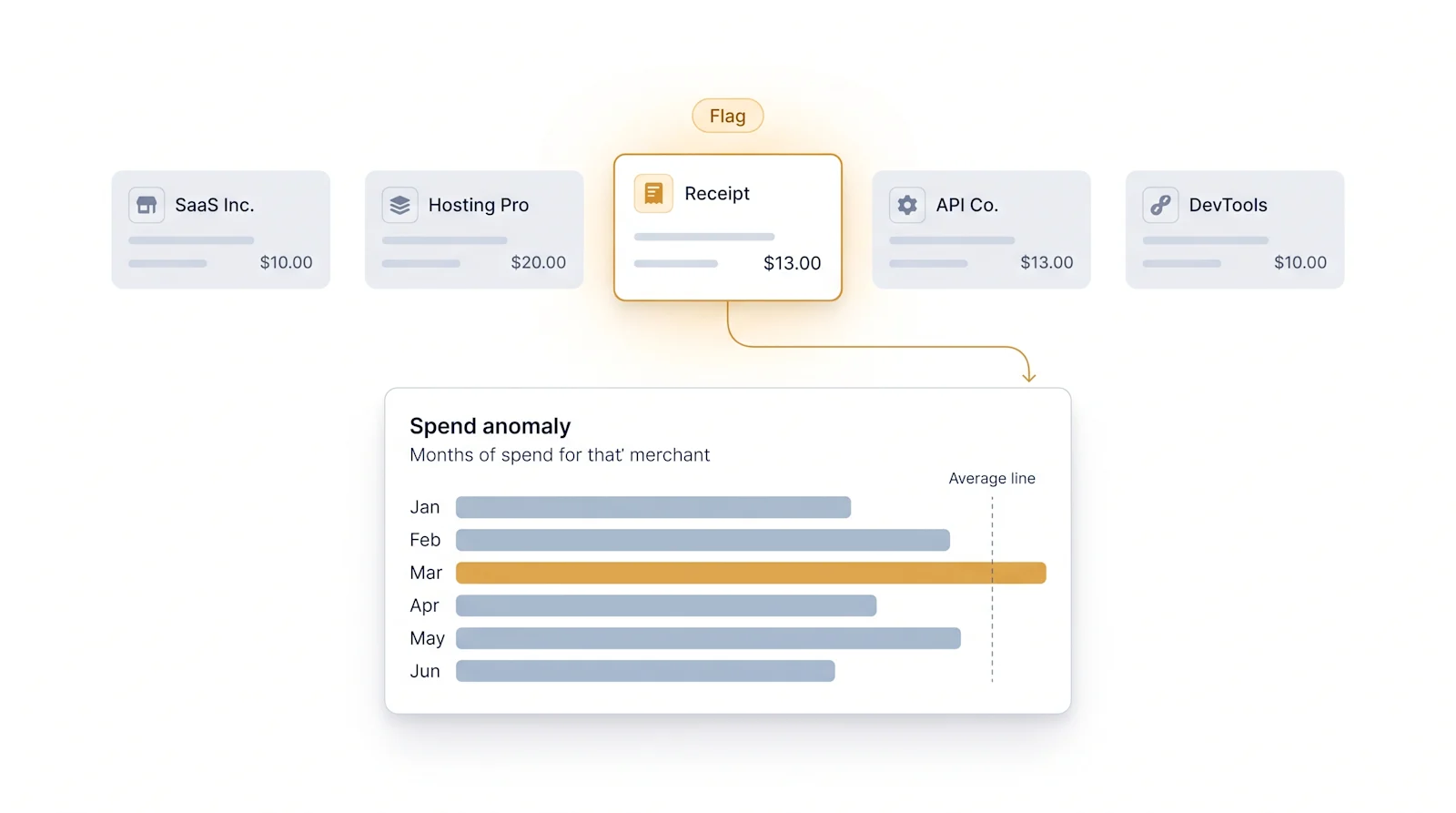
Ask: "Flag any receipts where the amount is more than 50% higher than the average for that merchant, or where the category looks inconsistent with the vendor type."
Receiptor AI already runs an automated anomaly detection layer on extraction. Layering a natural-language query on top lets you apply your own professional judgment as a filter, not just accept the system's pre-defined rules.
4. Compare spending patterns across periods
Ask: "Compare this client's expenses by category in Q1 2026 versus Q1 2025. What has changed by more than 20%?" This is the variance analysis accountants do manually for client reports: extract data from two periods, drop it into a spreadsheet, write the formulas. With queryable data, the analysis takes one prompt. The insight takes your expertise.
Firms using generative AI are already reporting a 12% rise in reporting granularity, with more specific expense breakdowns replacing broad catch-all categories.
5. Prepare for a client call in minutes
Before a quarterly review, ask: "Give me a summary of this client's top 10 vendors by spend this quarter, flag any new vendors that haven't appeared before, and list any documents still in the To Review queue." You walk into the call with a full picture of the account, rather than relying on whatever the client tells you. This is the kind of preparation that used to take 30 minutes of poking around in spreadsheets.
6. Identify likely categorization errors before close
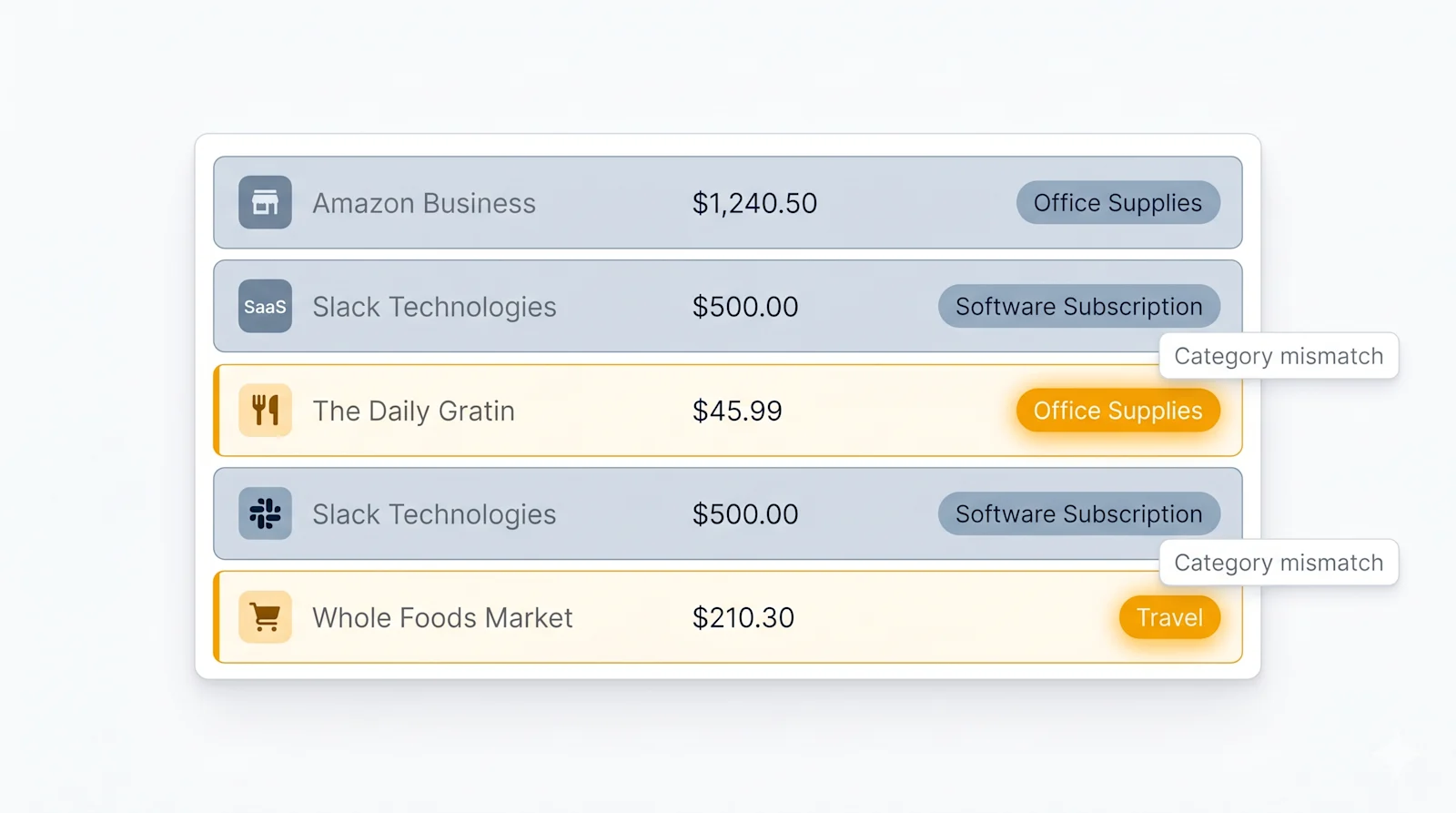
Ask: "Are there any documents categorized as Office Supplies with amounts over $300, or any Travel expenses from vendors that don't look like airlines, hotels, or transport?" Miscategorization often goes undetected until a client flags it or an auditor finds it. Querying for logical inconsistencies between vendor names and categories is something no standard accounting software report does natively; it requires the reasoning capability of an AI.
How to set this up for your practice
The setup has three steps: get your client's documents into Receiptor AI, then connect Receiptor AI to the AI assistant of your choice so it can reason over that data.
Step 1: Collect client documents with Receiptor AI (~30 minutes)
Create a separate workspace in Receiptor AI for each client. Invite the client as a Guest (they connect their inbox without accessing any other client's data) or connect the inbox directly if you have credentials.
Receiptor AI continuously monitors the inbox, extracting receipts, invoices, bills, credit notes, and order confirmations in real time. For new clients, run a retroactive extraction to pull months or years of historical documents from their inbox during onboarding. Every document is parsed for merchant, date, amount, tax, and line items, categorized against the client's chart of accounts, and flagged if anything looks unusual.
Step 2: Connect Receiptor AI to your AI assistant via MCP (~5 minutes)
MCP (Model Context Protocol) is a way to let you connect an AI like Claude or ChatGPT directly to an app and the data inside it. In this case, it connects your AI assistant to Receiptor AI, so it can read your client's actual documents and answer questions about them in real time.
For Claude:
- Open your Settings and go to Connectors > Add Custom Connectors
- Name your connector and use the server URL: https://mcp.receiptor.ai
- Sign in with your Receiptor AI account when prompted
For ChatGPT:
- Go to Settings > Apps > Advanced settings
- Enable Developer mode
- Click Create App, enter a name and the server URL: https://mcp.receiptor.ai
- Sign in with your Receiptor AI account when prompted
Once connected, the AI has read access to that client's structured document data. To switch clients, switch workspaces. Full setup guide at docs.receiptor.ai.
Step 3: Start querying (immediate)
There is no fixed prompt template. Describe what you want in plain English and the AI will query the relevant documents. Start with the questions you find yourself answering manually most often, then expand.
A few prompts to get started:
- "Show me all expenses over $500 this quarter that are coded to Miscellaneous."
- "Which vendors appear in the data for the first time this month?"
- "Summarise total spending by category for January to March 2026."
- "Are there any documents in the To Review tab that have been sitting there for more than two weeks?"
The AI queries the underlying document data to retrieve, aggregate, and reason over it. For bulk corrections identified during review, changes can be previewed before executing.
If you want to try this with Receiptor AI, start your 14-day free trial.
What this means for your practice
Once this is in place, the way you work with client data changes. Every client whose inbox is connected becomes a structured, queryable dataset. You stop waiting for documents, stop chasing for missing receipts, and stop spending hours preparing for client calls. Instead, you ask. The AI answers. You focus on the work that actually requires your judgment.
Practices running this setup handle more clients without adding headcount, catch issues earlier in the month rather than scrambling at tax time, and go into client conversations already knowing what the numbers say.
For practices building out their automation foundation, see How to Use Claude to Automate Your Business Finance and How to Use ChatGPT to Automate Your Business Finance for the broader workflow context. For a worked example of what AI-queryable expense data looks like in practice, How to Get a Weekly Expense Report for Your Restaurant Using AI shows the same pattern applied to a specific industry.
