
Restaurant owners can now get a weekly AI expense report by asking an AI assistant a plain-English question. Connect an AI agent like Receiptor AI to your email inbox and it automatically extracts every receipt and invoice from your suppliers. Link that agent to Claude, ChatGPT, or any compatible AI assistant and your financial data is ready to query instantly, without manual data entry.
What You Could Actually Do With This Setup
Imagine having an AI agent that automatically collects every receipt and invoice from your restaurant's email inbox and connects that data directly to the AI assistant you already use, whether that's Claude, ChatGPT, or another tool. An AI agent like Receiptor AI does exactly this: it scans your inbox continuously, extracts the key data from every supplier document, and makes it queryable in plain English.
Here are concrete examples of what you can do.
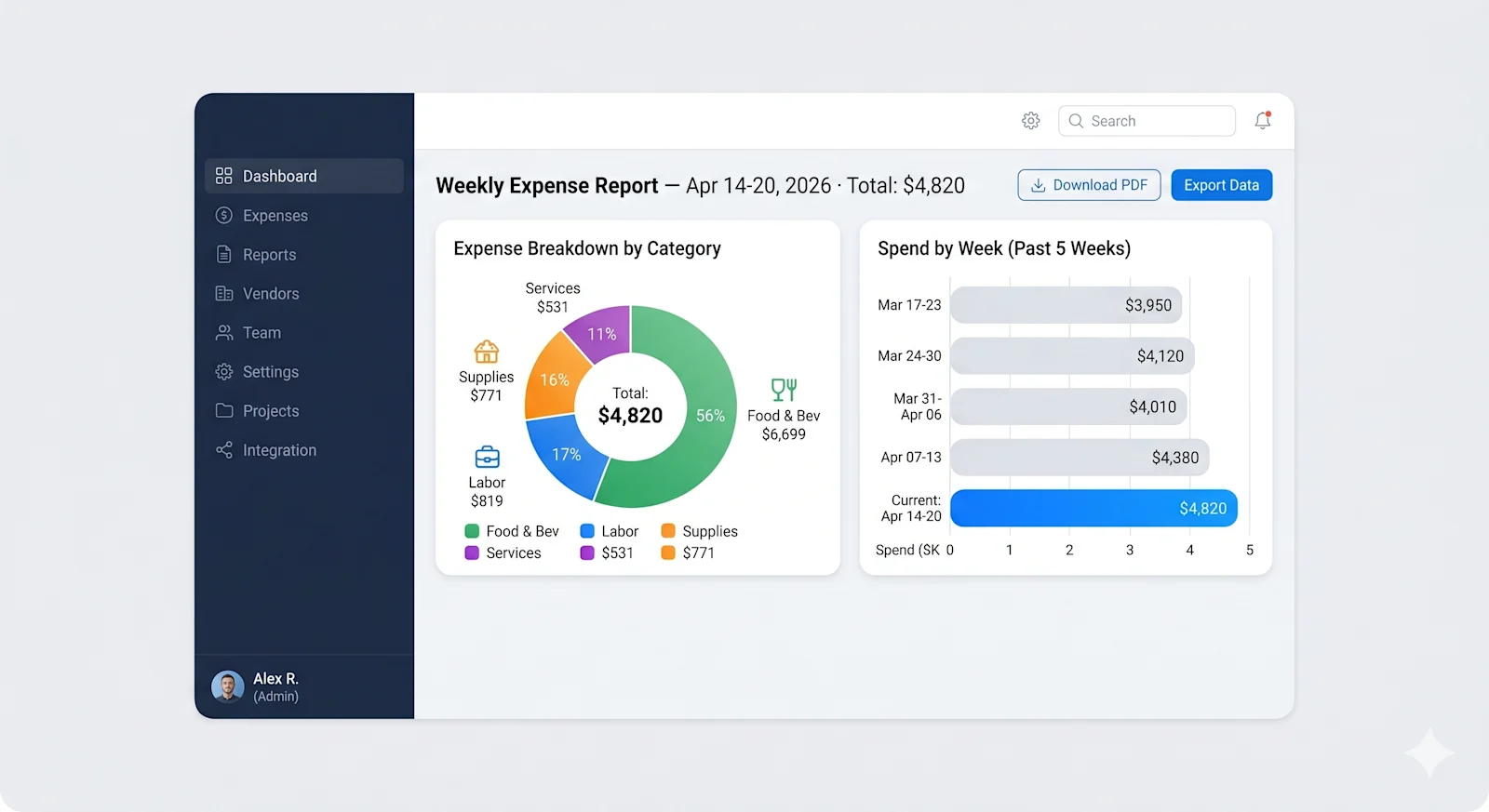
Track weekly spending by category
“Show me last week’s expenses broken down by food, beverage, supplies, and services.”
The AI searches your actual documents and returns a categorized summary in seconds.
Label wet and dry goods for inventory tracking
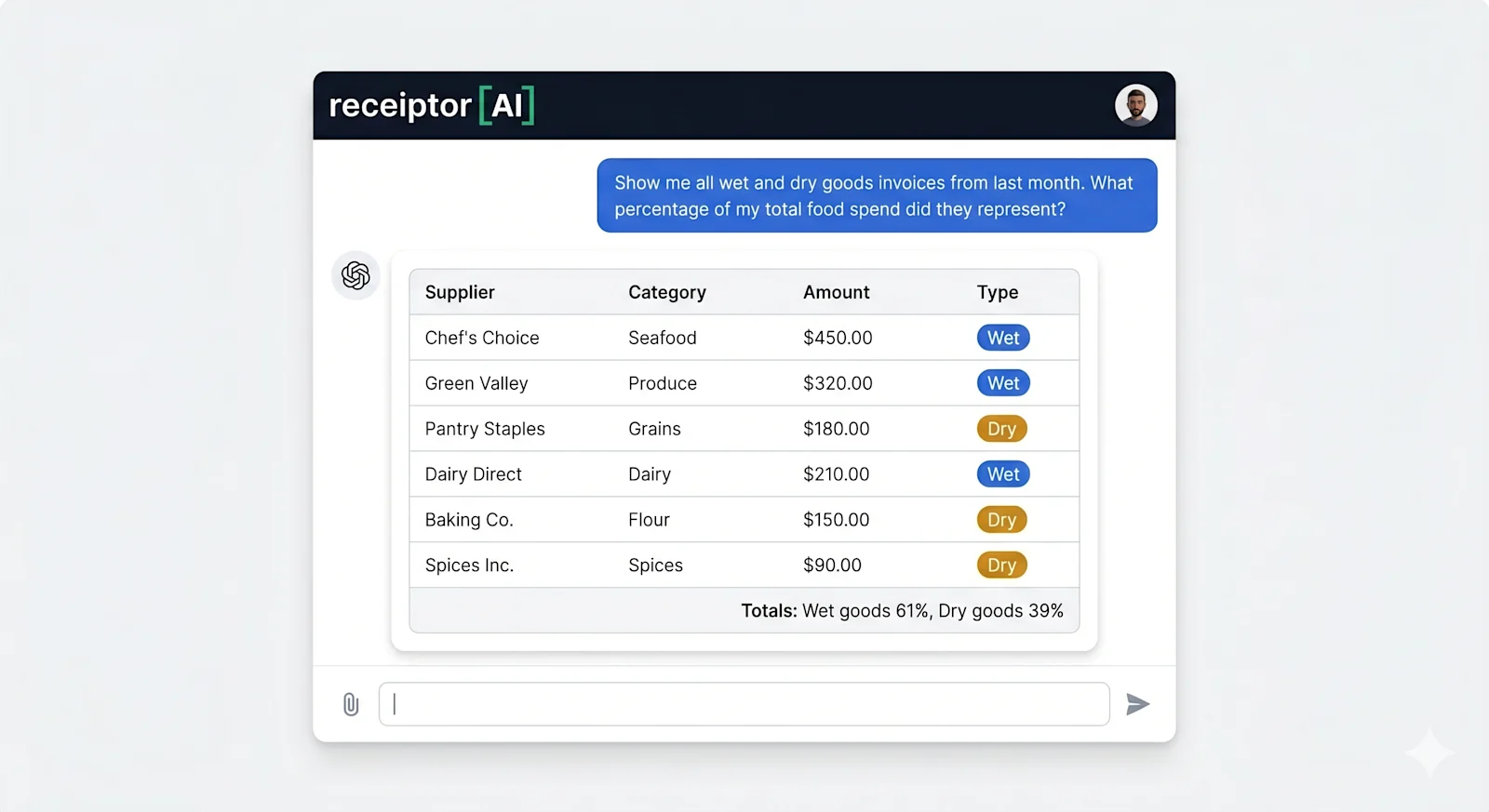
Knowing what share of your food spend went to wet goods versus dry goods in a given week is one of the fastest ways to catch inventory drift before it compounds. The question is not just totals: it is being able to see, clearly, which purchases are wet and which are dry, so you can track what matters for your inventory.
Ask: “Show me all wet and dry goods invoices from last month. What percentage of my total food spend did they represent?”
Where Receiptor AI has captured line-item data from your supplier invoices, you could label and group expenses at the item level. A produce invoice showing individual items and unit prices gives you the raw material for that kind of analysis: “Romaine, 12 cases, $2.40/unit” is no longer just a line on a PDF, it is a queryable data point.
Catch vendor price increases before they hit your margin
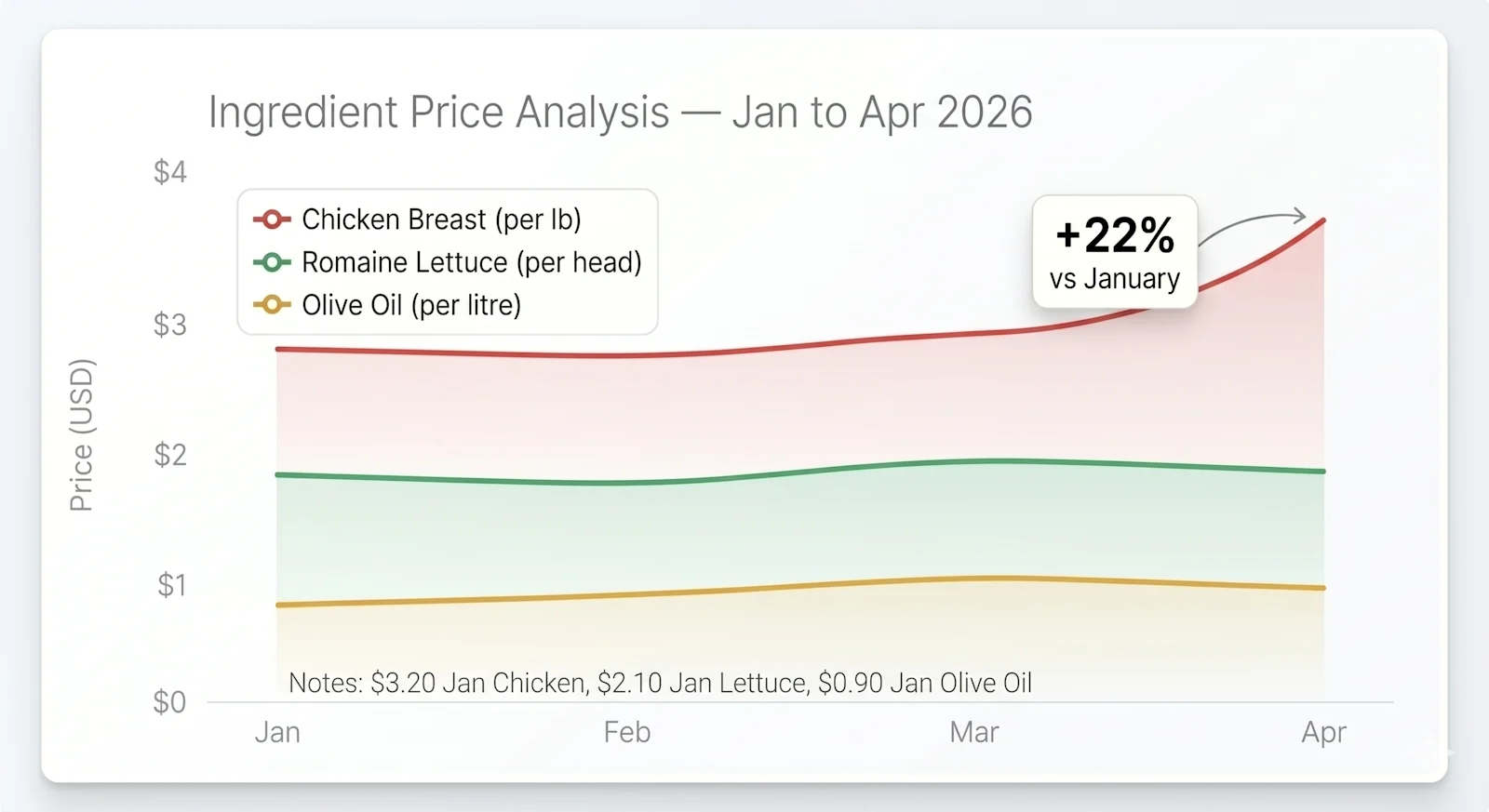
Food costs are running hot. The USDA projects dining-out inflation at 3.9% in 2026, and individual ingredient categories can move much faster. Catching a 10% unit price increase the week it happens is very different from catching it at month-end when the damage is already done.
Ask: “Compare what I paid per case of romaine from [vendor] this month versus two months ago.”
Or more broadly: “What were my five biggest expenses this week compared to last week?” Cost spikes that would take an hour to find manually surface in seconds.
Reconcile against your bank statement
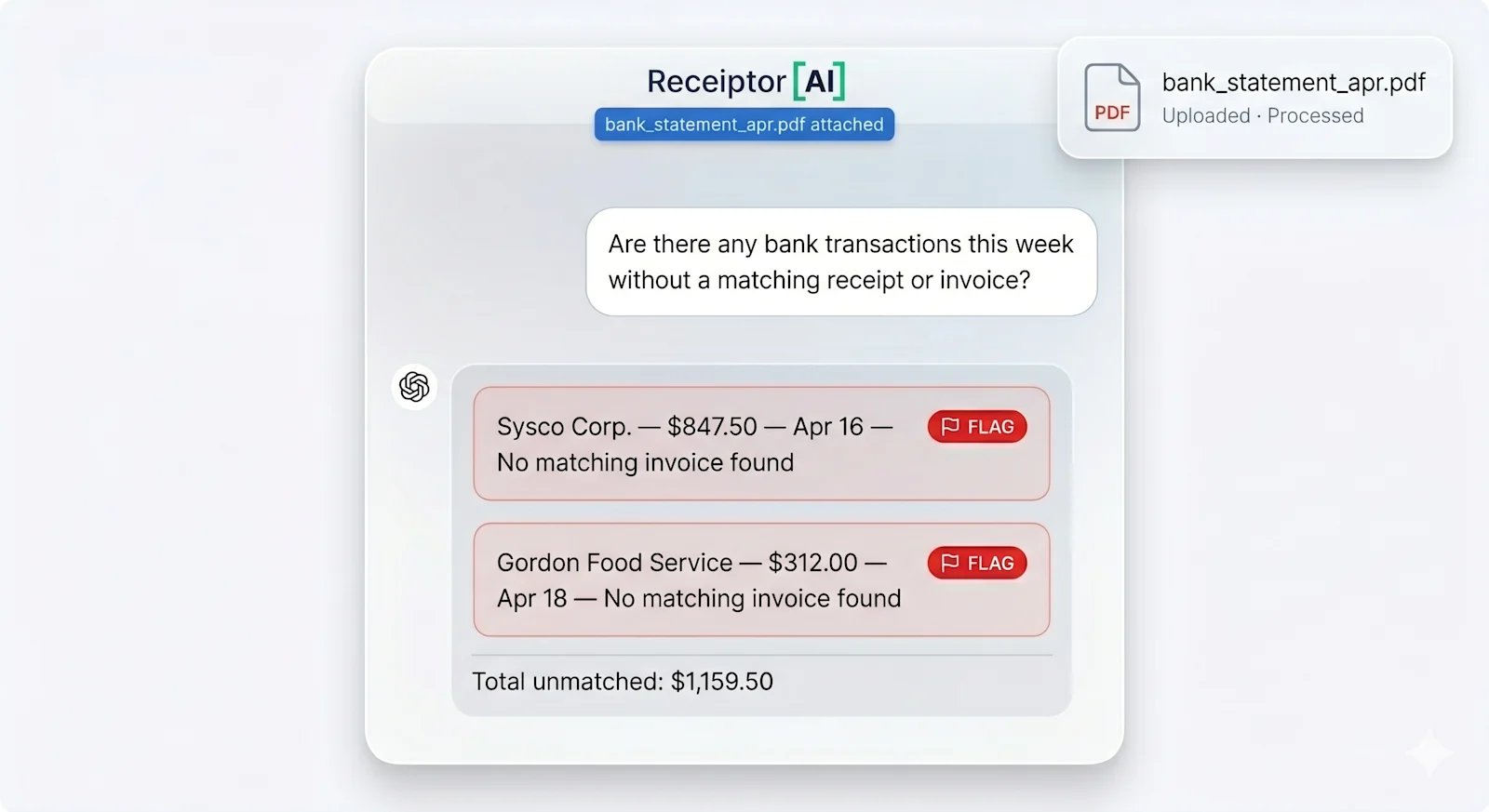
Upload your bank statement. With both your bank transactions and your extracted receipts and invoices in Receiptor AI, you can ask: “Are there any bank transactions this week that don’t have a matching receipt?”
Reconciliation, which typically takes a bookkeeper an hour, becomes a short question. Gaps surface immediately, and every match is backed by an actual document. The same logic applies to missing invoices: “Did I receive an invoice from [vendor] this week?” takes seconds instead of a manual inbox search.
Get a weekly report delivered automatically
Rather than pulling data manually every Monday, set up a scheduled task to send yourself a weekly expense summary automatically. Receiptor AI can generate a formatted CSV on any schedule you set, whether that routes directly to your accountant, feeds into a spreadsheet you maintain, or becomes the basis for a monthly review. If you use an AI assistant with scheduling capabilities like Claude, you can go further: set up a weekly briefing that arrives in your inbox every Monday morning, summarizing where you stand on food cost, which categories moved, and any anomalies worth a call.

Setting It Up: Two Steps
Setup takes under 10 minutes and requires no technical knowledge.
Step 1: Connect your email to Receiptor AI
Receiptor AI connects to your business email inbox and automatically extracts every receipt and invoice it finds. If you want to pull in past documents, you can run a retroactive scan that goes back months or years.
- Go to https://receiptor.ai and create an account
- Connect your business email inbox (works with Gmail, Outlook, and any email provider)
- Receiptor AI scans your inbox in the background, extracting receipts, supplier invoices, and service documents automatically
- Your documents appear in a central dashboard, organized by vendor, date, and amount
Every extracted document includes the key fields: vendor name, date, total amount, and where the supplier includes them, line-item details. Cash receipts can be added via Receiptor AI’s mobile scanner if needed. This is the data your AI assistant will query.
Step 2: Connect to your AI assistant
Receiptor AI provides a direct connection to AI assistants using a standard called MCP, which lets tools like Claude or ChatGPT read your real receipt data without you having to export a file or copy anything manually. Think of it as giving your AI assistant a live window into your receipt inbox.
In Claude:
- Open your Settings and go to Connectors > Add Custom Connectors
- Name your connector and use the server URL:
https://mcp.receiptor.ai - Authenticate with your Receiptor AI account when prompted
In ChatGPT:
- Go to Settings > Apps > Advanced settings
- Enable Developer mode
- Click Create App, then enter a name, a short description, and the server URL:
https://mcp.receiptor.ai - Sign in with your Receiptor AI account when prompted
Once connected, open a conversation and start asking about your restaurant expenses. You are not locked into any single AI tool.
Ready to set this up? Start your 14-day free trial at receiptor.ai and connect your first inbox in under 10 minutes.
Why Weekly Visibility Changes What You Can Act On
Prime cost, which is food, beverage, and all labor combined, typically runs 60-65% of total sales in a full-service restaurant and 55-60% in quick service. Your food cost percentage alone should land between 28% and 35% of sales. The National Restaurant Association reported a median of 32% for full-service restaurants in 2024.
Knowing your food cost is running at 34% instead of 31% at the end of the month is useful, but it is too late to recover anything that period. Weekly visibility changes what you can actually do about it. If produce costs spiked mid-week because a supplier substituted a higher-cost item, you see it in your next question. If a vendor quietly raised unit prices on two line items, you catch it before it runs through a full month’s orders.
Whether you prefer to ask your AI directly, pull a CSV, or share a formatted report with your accountant, having all your receipts and invoices automatically collected and organized is what makes any of those workflows faster and more reliable.
An AI expense report for your restaurant does not replace your accountant. What it does is give you the visibility to show up to that conversation already knowing where the numbers moved, which vendors to call, and where the margin pressure is coming from.
For more on using AI to automate business finance, see How to Use Claude to Automate Your Business Finance, How to Use ChatGPT to Automate Your Business Finance, and the Ultimate Guide to Small Business Expense Tracking.
